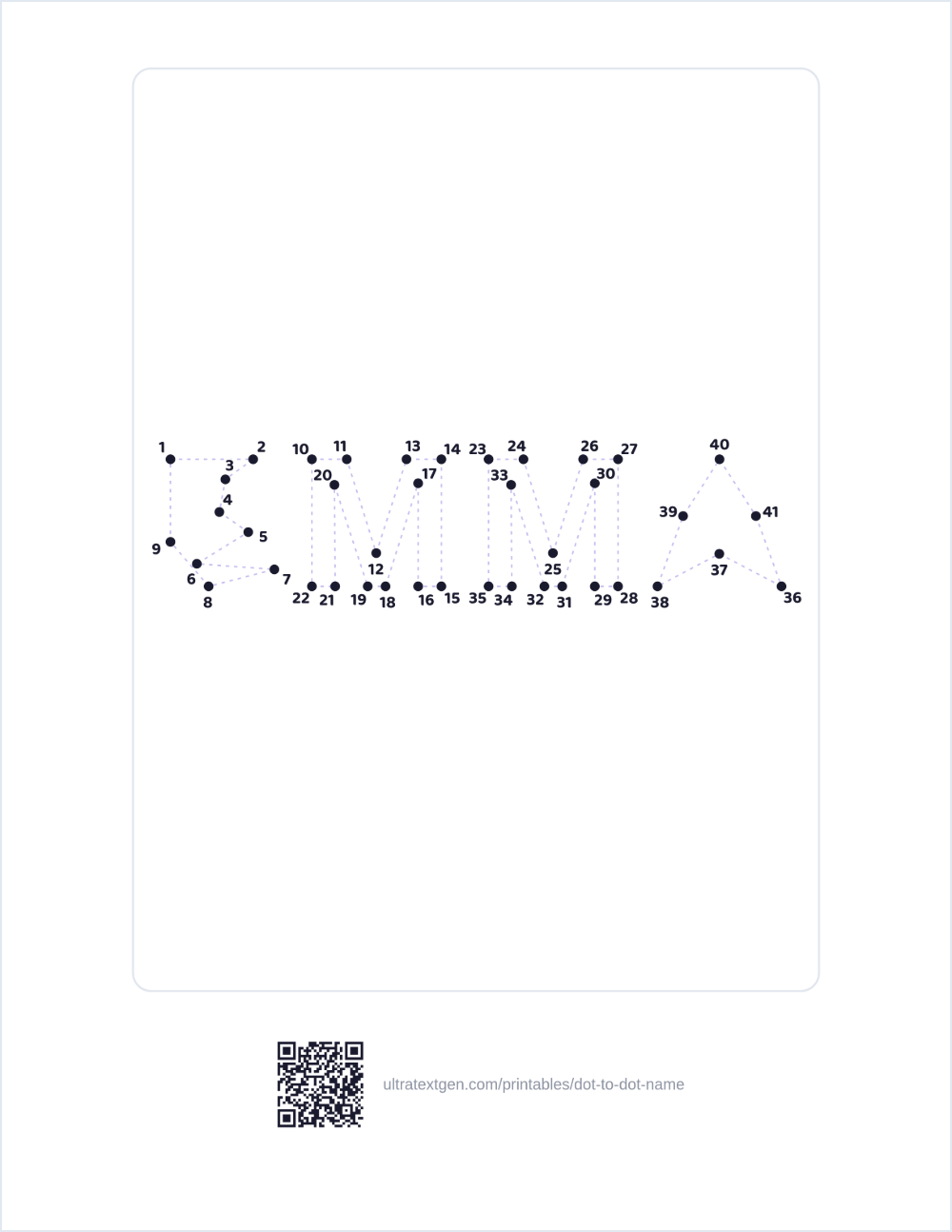
Type any name and get a personalized connect-the-dots puzzle: numbered dots trace
each letter's shape, with adjustable difficulty from easy to expert. Print it or download a PNG.
Free, no sign-up.
Build a dot-to-dot of any name
Type a name or word, pick a difficulty, and the puzzle builds live on the right. Print it, save a PDF, or download a PNG: free, no sign-up.
Up to eleven characters. The dots are spread along the letter outlines, so a longer name means smaller dots and smaller numbers: at eleven the numbers print around 8 pt, and past that they stop being readable by the child following them.
Difficulty (fewer dots is easier)
Some levels are off for this name. Each letter needs room for its own dots and numbers, so a longer name leaves fewer levels that would actually come out different on paper. A shorter name brings them back.
One print job, one sheet per level of the same name: start easy, finish at the hardest this name can carry. Levels that would print the same sheet twice are skipped. Download PDF saves the set as one PDF.
Border
Class set: one puzzle per name
Paste your class list (up to 60 names) and Download PDF builds one dot-to-dot per name at the difficulty picked above. Download PDF saves the whole set as one PDF. Download PNG saves the single name typed above.
Live previewUS Letter · print-ready
Runs entirely in your browser: nothing is uploaded. Download PDF keeps a copy you can print any time.
How the puzzle is built
Traced from the letters Each letter you type is traced in your browser and turned into an outline; numbered dots are placed evenly around that outline.
Any name works There's no library of pre-made pictures: the puzzle is built from whatever you type, so a name, a nickname, or a short word all work the same way.
Adjustable difficulty Easy uses fewer, widely-spaced dots for the youngest children; Expert packs in far more dots for a real challenge.
Optional guide lines A faint outline through the dots helps beginners; turn it off for a harder puzzle.
Ready to hand out Add a heading and a name-and-date line so the sheet is finished for a class set, no editing app needed.
Want a coloring page instead?
That is the Coloring Page Maker: the same name as big outline
letters to color, with interior fills like polka dots, stripes, hearts, and stars. Just need one letter instead of a whole name? Try the
dot-to-dot alphabet: a ready-made numbered puzzle
for every letter A–Z, no typing required.
Type a name into the box: the tool traces each letter's shape in your browser and places numbered dots around the outline, building a personalized connect-the-dots puzzle instantly. Download PDF or download a PNG. No sign-up, watermark, or limit.
Most dot-to-dot generators work from a fixed picture. This one builds the puzzle directly from the letters you type, so any name or word works: there's no library of pre-made pictures to search through, and no two names produce the same layout.
Yes. A difficulty control sets the dot density from Easy to Expert. Easy uses fewer dots with bigger gaps for the youngest children; Medium and Hard add more dots and finer letter detail; Expert packs in the most dots for a real challenge. Turn the faint guide lines off for a harder puzzle, or leave them on for extra help.
Yes, with the Coloring Page Maker, which prints the same name as big outline letters to color and adds interior fills like polka dots, stripes, hearts, and stars. This page keeps to the dot-to-dot.
Yes. The dot-to-dot alphabet has a ready-made numbered puzzle for every letter A-Z with no typing required. Use this name generator when you want a whole name or word instead of one letter.
Completely free, with no sign-up, no account, and no watermark. Everything is generated in your browser and nothing is uploaded. Make as many puzzles as you like.
Yes. Open Class set: one puzzle per name, paste your class list with one name per line (up to 60 names),
and Download PDF builds one dot-to-dot per child at the difficulty you picked. Download PDF saves it
“Save as PDF” to keep the whole set as one PDF. There is also Save all 4 levels,
which prints the same name at easy, medium, hard and expert difficulty in one job.