The Bold Isn't a Costume. It's a Different Letter.
Ask most people how a font generator works and you'll get some version of "it applies a font to my text." It doesn't. It can't. A font is a file installed on a device, and no website can install files onto Instagram's servers or your reader's phone. Something else is happening, and it's stranger and more elegant than a font.
The generator is swapping your letters for entirely different characters. When you type "bold" and get 𝗯𝗼𝗹𝗱, none of your original letters survived. Each one was replaced by a lookalike from a distant corner of the Unicode standard: the same universal character catalog that gives every letter, symbol, and emoji on Earth a number.
The regular letter a is character number U+0061. The bold 𝗮 is character number U+1D5EE. To a computer these are as unrelated as "a" and "%". It is not the same letter wearing a costume: it's a different letter that happens to be drawn to resemble a bold a. That single fact is the master key to this entire guide: it explains why the styling survives copy-paste, why platforms can't remove it, why usernames reject it, and why it sometimes collapses into boxes.
These Characters Were Built for Math, Not Bios
Why would Unicode contain a second, bold copy of the whole alphabet? Not for aesthetics. In 2001, Unicode added the Mathematical Alphanumeric Symbols block (U+1D400–U+1D7FF) because mathematicians needed style to carry meaning. In a physics paper, 𝐇 (bold) might be a matrix while 𝐻 (italic) is a variable and ℍ (double-struck) is a number system, three different objects that must stay distinct even in plain text.
So Unicode shipped whole parallel alphabets: 𝗯𝗼𝗹𝗱 𝘀𝗮𝗻𝘀, 𝘪𝘵𝘢𝘭𝘪𝘤, 𝒮𝒸𝓇𝒾𝓅𝓉, 𝔉𝔯𝔞𝔨𝔱𝔲𝔯, 𝕕𝕠𝕦𝕓𝕝𝕖-𝕤𝕥𝕣𝕦𝕔𝕜, 𝚖𝚘𝚗𝚘𝚜𝚙𝚊𝚌𝚎. Fraktur wasn't added to make gothic usernames: it's how mathematicians write Lie algebras. Then the internet discovered that these characters paste beautifully into any bio, and an academic tool became the engine of every "fancy font" site on the web.
A few styles come from elsewhere in the catalog: ꜱᴍᴀʟʟ ᴄᴀᴘꜱ is largely borrowed from phonetic notation, and circled or fullwidth letters come from East Asian typography. The symbol library catalogs thousands of these repurposed characters, and fancy fonts and accents covers what happens when they meet accented letters. The pattern is always the same: characters designed for one job, borrowed for decoration.
The Four-Layer Model
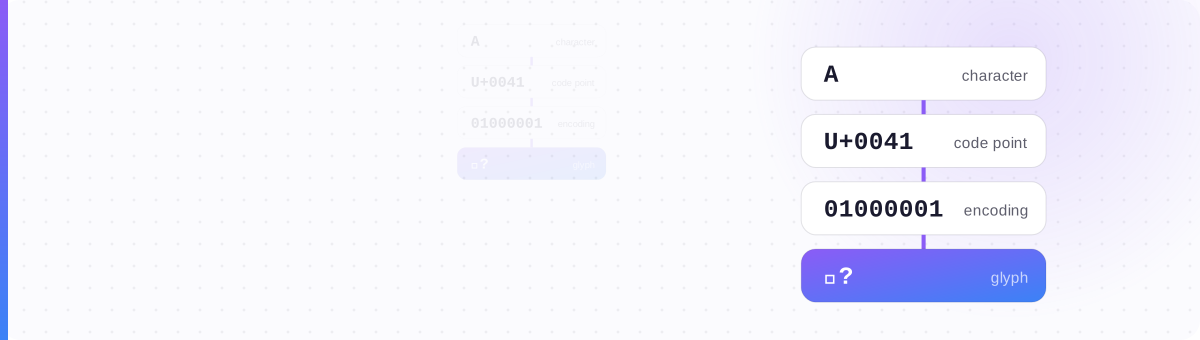
Here is the mental model that makes every text failure diagnosable. Between your intention and your reader's eyeball, text passes through four layers. Each layer can fail, and each failure has a distinct signature.
| Layer | What it is | Question it answers | What breaks here |
|---|---|---|---|
| 1 · Character | The abstract letter you mean — "bold sans a" | Which symbol is this? | Rejected usernames, search misses, screen-reader confusion |
| 2 · Code point | Its number in the Unicode catalog — U+1D5EE | What's its ID? | Lookalike filters and anti-impersonation checks act here |
| 3 · Encoding | The bytes that carry it in transit — UTF-8: F0 9D 97 AE | How does it travel? | Mojibake (é garbage), � replacement characters |
| 4 · Glyph / Font | The picture the reader's device draws | What does it look like? | Tofu boxes □, styles that look different per device |
Notice who owns each layer. You control layer 1 (what you type). The Unicode Consortium owns layer 2. The network and the platform handle layer 3, and in 2026, UTF-8 is so universal that layer 3 almost never fails anymore. Layer 4 belongs entirely to the reader's device. That's the punchline most people miss: the last and most visible layer is the one the author has zero control over. When your gothic bio turns into □□□□ on a friend's phone, nothing you sent broke: their device just has no picture for those characters. Why fonts show as boxes dedicates a whole guide to that one layer.
Every Common Failure, Mapped to Its Layer
Once you know the layers, every complaint you've ever seen about "fonts breaking" files itself neatly. Diagnose the layer and the fix becomes obvious.
| What you see | Layer | What's really happening | The fix |
|---|---|---|---|
| □□□ tofu boxes | 4 · Glyph | Reader's device has no picture for the character | Use a safer style (bold/italic, not Fraktur) |
| "Username contains invalid characters" | 1 · Character | The field whitelists plain a–z; styled letters aren't on the list | Keep handles plain; style the display name or bio |
| Bold vanished from your Discord message | 1 · Character | That was Markdown formatting, not Unicode — different mechanism entirely | See Discord formatting decoded |
| Profile never appears in search | 1 · Character | The index stored 𝓭𝓮𝓼𝓲𝓰𝓷𝓮𝓻; people search "designer" — no match | Keep findable words plain |
| Screen reader spells out gibberish | 1 · Character | It announces "mathematical bold small a…" letter by letter | Style less; see the accessibility guide |
| é mojibake garbage | 3 · Encoding | Bytes decoded with the wrong charset — rare now, usually old exports | Re-copy from the source; not a style problem |
Why Bios Say Yes and Usernames Say No
The model also explains the two behaviors that confuse people most: styled text pastes everywhere, yet certain fields flatly refuse it. Both follow from the same fact: the styling is the characters.
Copy-paste works because there is nothing extra to lose. When a word processor makes text bold, the bold is metadata riding alongside plain letters, and it dies the moment you paste into a plain-text box. Unicode styling has no metadata: 𝗯𝗼𝗹𝗱 is just four characters, so any field that accepts text accepts them, styling intact. By the same logic, a platform cannot "strip" the style from your bio: there's no style layer to peel off. Removing the bold would mean rewriting your characters into different characters, and platforms don't rewrite what you typed into free-text fields. (The persistent rumor that Instagram punishes fancy bios doesn't hold up either: see the shadowban myth, tested.)
Accepts any Unicode. Your 𝓼𝓽𝔂𝓵𝓮𝓭 characters are stored and echoed back exactly. Styling survives.
Validated against a whitelist (often just a–z, 0–9, . and _) because handles live in URLs and logins, where lookalikes enable impersonation. Styled characters bounce at the door.
Stored as typed, but the search index normalizes or ignores exotic characters. Your text displays fine yet never matches a query.
So "will this field take my fancy text?" is really "is this a display field or an identity field?" Games are the strictest case of all, which symbols game usernames actually allow maps that territory.
When You Shouldn't Use Any of This
A pillar guide owes you the downsides, and they're not small. Because a styled 𝗮 is a genuinely different character, every system that treats text as meaning rather than pixels gets worse:
- Screen readers often announce styled words character by character ("mathematical bold small b, mathematical bold small o…") turning your hook into noise for blind readers. The accessibility guide shows exactly what each style sounds like.
- Search and discovery silently fail. A recruiter searching "designer" will never surface the profile that says 𝓭𝓮𝓼𝓲𝓰𝓷𝓮𝓻, and on LinkedIn that has real costs (what recruiters and ATS systems see).
- Old devices still draw tofu for the rarer blocks, so the fancier the style, the smaller the audience that sees it as intended.
The working rule: style the decoration, never the information. A styled flourish around a plain, searchable, hearable core sentence gets you the attention without the costs. If a word needs to be found, heard, or typed by someone else, leave it plain.
The style is the letters.
Once you see that, every "broken font" mystery solves itself.
See it for yourself: style any text →
Type a word and watch it re-spelled in dozens of parallel Unicode alphabets: bold, italic, script, Fraktur and more. Copy any of them: it's just text.
Open the Text Generator →