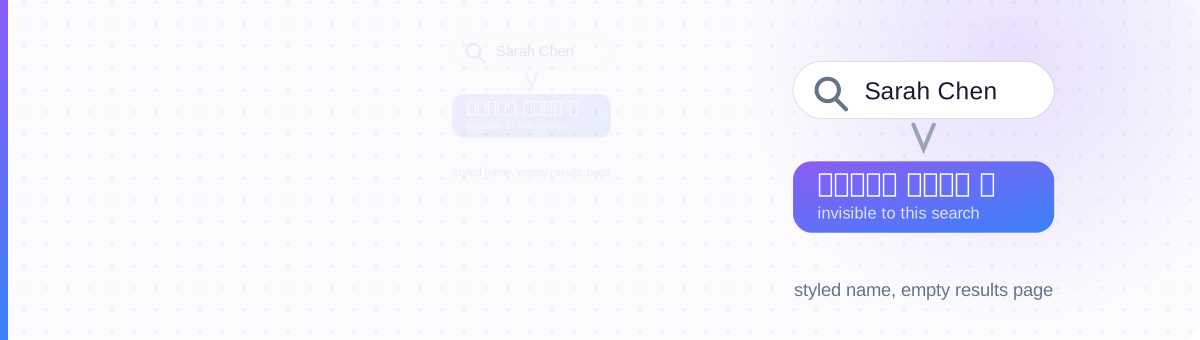
A Styled Name Is an Invisibility Cloak
You changed your LinkedIn name to 𝓢𝓪𝓻𝓪𝓱 𝓒𝓱𝓮𝓷 because it looks distinctive in the feed. It does. It also just did something you didn't intend: it removed you from recruiter search.
Here's the mechanism, and it's brutally simple. Those "fancy fonts" aren't fonts: they're different characters. The script 𝓢 is a mathematical symbol from a distant corner of Unicode, not a stylish version of S. When a recruiter opens LinkedIn Recruiter and types S-a-r-a-h on an ordinary keyboard, the system looks for profiles containing those exact characters. Your name contains none of them. Not a partial match, not a fuzzy match, zero matches. You haven't been demoted in the results; you've been deleted from the query's universe.
Job searching is the one context where this isn't a cosmetic quibble. Your name, your headline keywords, and your skills are the handles other people use to pull you out of a database of a billion profiles. Style those handles, and nobody can grab them. That's why our position in this guide is blunt: decoration belongs where nobody searches. Everywhere else, plain text is doing a job you can't see, until it stops.
Recruiter Search Reads Code Points, Not Shapes
To a human eye, 𝗦𝗮𝗿𝗮𝗵 and Sarah are obviously the same name. To a search index, they share nothing at all. The plain S is code point U+0053. The bold 𝗦 is U+1D5E6, from the Mathematical Alphanumeric Symbols block, a region of Unicode designed for equations, which generators borrow to fake bold and cursive. (If you want the full story of that trick, read how Unicode fonts actually work.)
Search engines match code points. Some systems normalize accented characters, é can match e, but mathematical alphanumerics generally survive normalization as the exotic symbols they are. In practice: every styled letter in a searchable field is a letter recruiters cannot type. One styled character in your name is enough to break an exact-name query.
And there's a second problem stacked on top. LinkedIn's name policy requires your real name in the Name field and explicitly disallows symbols, numbers, and special characters, and styled Unicode letters are special characters, whatever they look like. Profiles get flagged and can be restricted until the name is corrected. So the fancy name isn't just invisible; it's against the rules of the platform you're trying to be hired through.
What Applicant Tracking Systems Do With Styled Text
Recruiter search is only half of the pipeline. The other half is the applicant tracking system, the software that parses your resume or Easy Apply data into structured fields before a human ever looks at it. ATS parsers were built for plain text. Feed one a line of mathematical alphanumerics and you'll get one of three outcomes, none of them good.
The parser discards characters it doesn't recognize. 𝗣𝗿𝗼𝗱𝘂𝗰𝘁 𝗠𝗮𝗻𝗮𝗴𝗲𝗿 becomes an empty job-title field. The keyword you were counting on simply isn't in your application anymore.
The characters survive but the system can't render or index them: ???????? ??????? or □□□□□□□ where your title should be. A human reviewer sees gibberish next to your name.
Stricter systems refuse the field or the file outright, flagging it as malformed input. Your application stalls on a validation error you'll never be told about.
The cruel part is the asymmetry: everything looks perfect on your screen. The damage happens inside software you never see, to a version of your application you never get to review. That's why "ats unicode resume" horror stories keep surfacing in job-hunt forums: the failure is invisible until the interviews don't come.
The Style-Safe Job Search Map
None of this means styled text has no place in a job search. It means styled text has a map. Every LinkedIn surface falls into one of three zones, defined by a single question: does a machine ever need to read this field to find or process you?
🔴 RED: never style. Anything a recruiter searches or an ATS parses: your name, the keywords in your headline, your skills, job titles, employers, certifications. 🟡 YELLOW: style sparingly. Surfaces that are read by humans but occasionally scraped: About-section headers, section dividers. 🟢 GREEN: decorate freely. Post bodies and comments, where discovery happens through the feed, not through search.
| Field | Zone | Why | What recruiters / ATS see |
|---|---|---|---|
| Name | 🔴 RED | The #1 search query about you, plus LinkedIn's policy bans special characters here | Styled name never matches a typed search; profile risks a flag |
| Headline keywords | 🔴 RED | Keyword search is exact code-point matching | 𝙋𝙧𝙤𝙙𝙪𝙘𝙩 𝙈𝙖𝙣𝙖𝙜𝙚𝙧 never appears for "product manager" |
| Skills, titles, certifications | 🔴 RED | Powers Recruiter filters and ATS field mapping | Stripped from filters; parsed as empty or garbage |
| Resume / Easy Apply fields | 🔴 RED | Parsed by ATS software built for plain text | Stripped, garbled to ??? / □□□, or rejected |
| About-section headers | 🟡 YELLOW | Rarely searched, but screen readers and scrapers stumble | Usually fine in small doses; keep keywords in plain sentences |
| Dividers between sections | 🟡 YELLOW | Pure decoration, no keywords involved | Harmless — machines skip them, humans get structure |
| Post body emphasis | 🟢 GREEN | Recruiters don't find candidates by searching post text | 𝗕𝗼𝗹𝗱 hooks render as intended; zero findability cost |
| Comment emphasis | 🟢 GREEN | Conversational surface, never parsed for hiring | Safe — stands out in the thread, invisible to the pipeline |
Memorize the boundary, not the rows: if a field describes you, keep it plain; if a field is you talking, style away. The map also has an accessibility dimension: styled characters are read letter-by-letter or skipped by screen readers, which is one more reason to keep RED-zone fields clean. Our accessibility guide covers that side in depth.
Plain Name, Styled Posts: the Before and After
Here's what the map looks like applied to a real profile. Same person, same personality, but the second version is findable by every recruiter and readable by every parser.
Notice where the personality went. It didn't disappear: it moved from the record (name, headline) to the conversation (the post hook), which is the one place bold text actually earns attention. If you're rebuilding your headline, our LinkedIn headline tool keeps keywords plain while letting you style the separators.
The 60-second self-test
Want to know what a parser sees? Run the plain-text test: open your profile, select your name, headline, and About section, and paste them into a bare text editor: Notepad, TextEdit in plain mode, anything without font rendering. Then press Ctrl+F and search for your own name and your target job title, typed normally. If the search can't find them, neither can a recruiter. Whatever fails that test gets converted back to plain characters today.
Where the Warning Doesn't Apply
Let's be fair to the other side, because blanket "never use Unicode fonts on LinkedIn" advice is as wrong as styling your name. Bold text in post bodies is harmless to your job search. Recruiters do not find candidates by keyword-searching post text; they search names, headlines, titles, and skills. A post that opens with a bolded hook loses nothing in findability, and the evidence on how it affects feed performance is a separate question entirely, which we dug into in our guide to LinkedIn bold text and reach.
Two honest caveats even inside the GREEN zone. First, accessibility: screen readers spell out or skip mathematical alphanumerics, so style a few emphasis words, not whole paragraphs. Second, moderation: keep it to clean bold and italic: zalgo and heavy decoratives read as spam to both humans and filters. One bolded line per post is emphasis; five is noise.
And if you're tempted to split the difference with a "lightly" styled name (one cursive initial, a single ✦) don't. One special character breaks exact matching just as thoroughly as a fully cursive name, and it's still a policy violation. The RED zone has no light version. Style your LinkedIn posts instead, where the same characters work for you rather than against you.
is a letter recruiters can't type.
Decorate the conversation. Never the record.
Style posts, not your name →
Keep your name and headline plain and findable, then make your posts impossible to skim past. Bold hooks, italic asides, clean dividers, ready to paste.
Open the LinkedIn Text Generator →