"Broken Text" Is Three Complaints Wearing One Costume
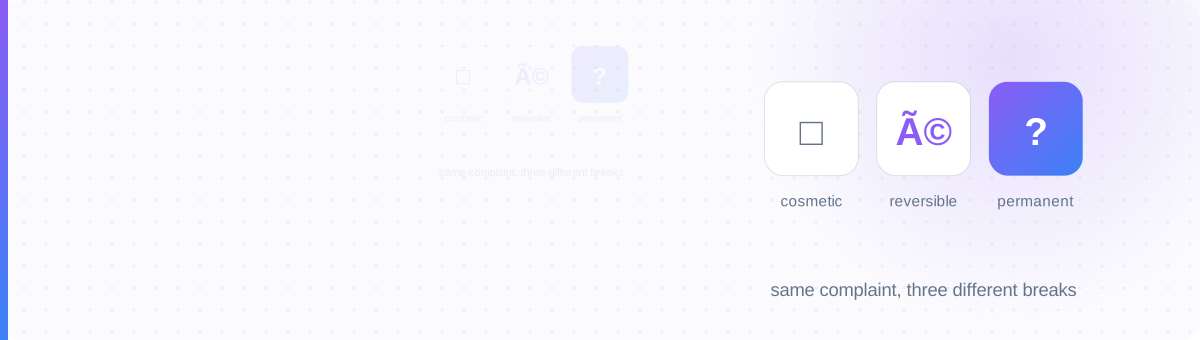
Someone pastes styled text into a form, saves it, and it comes back wrong. They report it the same way every time: "the text is broken." But open the actual result and it's rarely the same failure twice: sometimes it's a row of empty squares, sometimes it's a string like café, sometimes it's just a bare question mark where a letter used to be.
These look similar because they all produce visual nonsense where readable text should be. They are not the same problem. Each one happens at a different point in the pipeline that turns a character into pixels on a screen, and where a failure happens determines whether it can be undone.
The pipeline, from the pillar guide's Four-Layer Model, is: a character you type, assigned a code point (a number), stored as bytes via an encoding, and finally drawn as a glyph by a font. Boxes, mojibake, and question marks each break at a different one of those steps.
The Recovery Triage
Before you try to fix broken text, work out which layer failed. That single fact tells you whether there's anything to fix at all.
| Looks like | Layer that failed | What actually happened | Fixable? |
|---|---|---|---|
| □ ▯ empty box | Glyph | The character arrived intact; the device has no picture for it | Always — pick a safer style or device |
| é ’ garbled Latin | Encoding | The right bytes were decoded with the wrong character set | Often — re-decode with the correct encoding |
| ? or � replacement | Code point | The character was discarded during a narrower, lossy conversion | Never — the original identity is gone |
Notice the direction: failures get less recoverable the earlier in the pipeline they happen. A glyph problem is cosmetic. An encoding problem is a solvable puzzle. A code-point problem is data loss.
The Box: A Picture the Device Doesn't Have
A box, often nicknamed "tofu," means the character's identity was never in doubt: the device simply has no font that can draw it. This is the most common failure with styled Unicode "fonts," because those styles borrow rare Unicode blocks that not every device font ships a picture for.
It's also the easiest to fix, because nothing was lost: switch to a more universally supported style, or view it on a different device, and the exact same character renders fine. For the full breakdown of which Unicode styles are safest and why, see Why Your Fancy Font Turns Into Boxes.
Mojibake: The Right Bytes, the Wrong Instructions
Every piece of text is stored as bytes, and an encoding is the rulebook for turning those bytes back into characters. The most common one today is UTF-8. Mojibake happens when text encoded one way gets decoded with a different rulebook: the bytes never change, but the letters they're read as do.
The classic example: the word "café" is stored correctly as UTF-8, where "é" takes two bytes. Somewhere downstream, a system reads those same two bytes as Windows-1252 (a single-byte-per-character encoding) instead of UTF-8. Each byte gets mapped to its own separate character, and "café" comes out as café.
Because the underlying bytes are usually untouched, this is fixable if you still have access to the original bytes and can identify the correct encoding: decode with Windows-1252 to get back to the byte sequence, then re-decode that sequence as UTF-8. Once a system has "helpfully" saved the garbled version as its own new UTF-8 text, though, the original bytes are gone and the fix stops being reliable. You'd be decoding garbage as garbage.
The Question Mark: A Character That No Longer Exists
This is the one true data-loss case. It happens when text is forced through a narrower character set than the one it was written in: for example, converting rich Unicode text down to plain ASCII (128 characters) or Windows-1252 (256 characters) for an old database column, a legacy export format, or a strict form field.
Every character that doesn't exist in the narrower set has nothing to be mapped to, so the converter substitutes a stand-in: a literal ?, or the official Unicode replacement character, U+FFFD (�). Either way, the original code point, the character's actual identity, is discarded in that step. There is no byte sequence left to re-decode, because the character was never stored; it was replaced.
This is why "is there a way to undo this" is the wrong question once you're looking at a question mark. The honest answer is: only if you still have the original source (the message you sent, the file you uploaded) somewhere the lossy conversion hasn't touched yet.
Side by Side
Glyph layer. Character intact, no picture to draw it. Fixable: change style or device.
Encoding layer. Right bytes, wrong rulebook. Often fixable: re-decode correctly, while the original bytes still exist.
Code point layer. Character discarded by a narrower conversion. Not fixable: nothing left to decode.
Where Each One Shows Up
- Boxes: bios and names with styled Unicode "fonts," viewed on an older Android phone or an app with a limited font. See the Style Safety Tiers.
- Mojibake: CSV exports opened in the wrong spreadsheet locale, old CMS databases created before UTF-8 was standard, and email clients that guess the wrong charset on a message header.
- Question marks / replacement characters: legacy sign-up forms with ASCII-only name fields, SMS gateways with strict character budgets, and old ticketing or CRM systems built long before emoji and styled Unicode existed.
Mojibake is a translation problem.
A question mark is a loss.
Only two of the three have a way back.
Start from clean, safe text
Generate a style from the safest tiers so what you paste survives the trip, no boxes, no surprises downstream.
Open the Text Generator →